Self-Hosting an LLM on AKS with vLLM: The Same Way the Big Labs Do It
Self-Hosting an LLM on AKS with vLLM: The Same Way the Big Labs Do It
Most of us only ever meet a large language model through someone else's API. You send some text, a model you will never see answers it, you pay per token, and the machinery in between stays completely hidden. That is convenient — but it leaves an interesting question hanging:
What is actually running on the other side of that API call, and could I run it myself?
It turns out you can. And the surprising part is that the way you would do it on a single cheap GPU is structurally the same way Anthropic, OpenAI, and every other serious lab serves models at scale. Same inference engine pattern, same OpenAI-shaped API, same container-on-Kubernetes-with-GPUs deployment model. They just have thousands of GPUs and a lot more hardening.
This is the write-up of a project where I set out to learn that stack from the ground up: a self-hosted, OpenAI-compatible LLM endpoint running Qwen2.5-7B-Instruct on Azure Kubernetes Service (AKS), served by vLLM, provisioned entirely with Terraform, on a single GPU that scales to zero when nobody is using it.
The whole thing is open source — everything in this post is built from here: github.com/okaneconnor/vllm-aks-terraform.
Before any of the deployment detail, though, it is worth being clear about the most important component — because it is the one most people have never heard of.
What Is vLLM?
When people talk about "running an LLM," they usually mean two separate things mashed together: the model (the weights — the billions of numbers that encode what the model knows) and the inference server (the software that loads those weights onto a GPU and actually turns your prompt into tokens).
vLLM is the inference server. It is an open-source, high-throughput serving engine for LLMs and it has quietly become one of the de-facto standards for hosting open models in production.
What makes it special is not that it can run a model — lots of things can do that slowly. It is how efficiently it serves many requests at once. Two ideas do most of the heavy lifting:
- PagedAttention. Generating text means keeping a "KV cache" in GPU memory for every active request. Naively, that memory gets fragmented and wasted. vLLM borrows an idea from operating systems — paging — to manage that cache in small blocks, so it can pack far more concurrent requests into the same GPU. This is the innovation vLLM is famous for.
- Continuous batching. Instead of waiting to gather a fixed batch of requests, vLLM continuously slots new requests into the GPU as others finish. The GPU stays busy, and throughput goes up dramatically.
So in one sentence: vLLM is the thing that takes a pile of model weights and turns it into a fast, production-grade, OpenAI-shaped API.
Why Bother Learning This?
A few honest reasons:
- To actually understand the stack. It is one thing to read that LLMs run "on GPUs in the cloud." It is another to provision the GPU, watch the model load into VRAM, debug why it crashes, and serve your first token. The understanding you get from doing it is not replaceable.
- Ownership and control. Your data never leaves your cluster. You choose the model, the version, the configuration.
- Cost, at the right scale. Per-token APIs are cheap until they are not. For sustained or batch workloads, a GPU you control can be far cheaper — if you can avoid paying for it while it sits idle, which is the core problem this project solves.
- It is the real pattern. This is not a toy architecture. It is a scaled-down version of how production LLM serving genuinely works, which makes it the perfect thing to learn on.
How the Big AI Companies Actually Do This
Here is the part that reframes the whole project. When you strip away the scale, frontier-lab inference looks remarkably like what we are about to build:
- A model loaded into GPU memory.
- A high-throughput inference server (vLLM, or close cousins like TensorRT-LLM and TGI) maximising how many requests each GPU can handle, using exactly the PagedAttention / continuous-batching ideas above.
- Containers orchestrated by Kubernetes, scheduled onto pools of GPU nodes.
- An OpenAI-compatible API behind a load balancer.
- Autoscaling that adds and removes GPU capacity as traffic rises and falls.
The differences are real but they are differences of degree, not kind: thousands of top-end GPUs instead of one old one, multi-region clusters instead of one, warm capacity pools and traffic-aware routing instead of a simple scale-to-zero, and serious investment in observability and reliability. But the skeleton is identical. If you understand the small version, you understand the shape of the big one.
That is the whole thesis of this project: learn the fundamentals on one £0.40-an-hour GPU.
The Deployment Approach — And Why I Chose It
There is more than one way to host a model, so the first real decision was what kind of deployment this should be. The options roughly are:
- A managed model endpoint (e.g. a cloud provider's hosted inference service). Easiest, but it hides the very stack I wanted to learn, and locks you into their catalogue and pricing.
- A single GPU VM running vLLM directly. Simple, but you own all the undifferentiated work yourself — restarts, scaling, networking, scheduling — and "scale to zero" means manually shutting a VM down.
- A container on Kubernetes with a dedicated GPU node pool. More moving parts up front, but it is the production pattern: declarative, self-healing, and it gives you real autoscaling — including scaling the GPU itself down to nothing.
I went with option 3 on AKS, because the entire point was to learn the pattern the industry actually uses, and because Kubernetes is what makes proper scale-to-zero possible.
A few specific choices fell out of that:
- vLLM in a container, requesting a GPU through Kubernetes' device-plugin mechanism (
nvidia.com/gpu). The cluster schedules it onto a node that has a GPU, exactly like any other resource request. - A dedicated, tainted GPU node pool. GPU nodes are the expensive part, so a taint keeps everything except the model off them. Cheap system nodes run the boring infrastructure (the ingress, the autoscaler); the GPU node does nothing but serve the model.
- Everything provisioned with Terraform, split into two stages — one that builds the cluster, and one that installs the platform and the model on top of it. (The split exists because the tools that configure inside a cluster cannot run until the cluster exists.) The payoff is that the whole environment is reproducible from code, and just as importantly, destroyable from code — which matters enormously when the thing you are destroying bills by the hour.
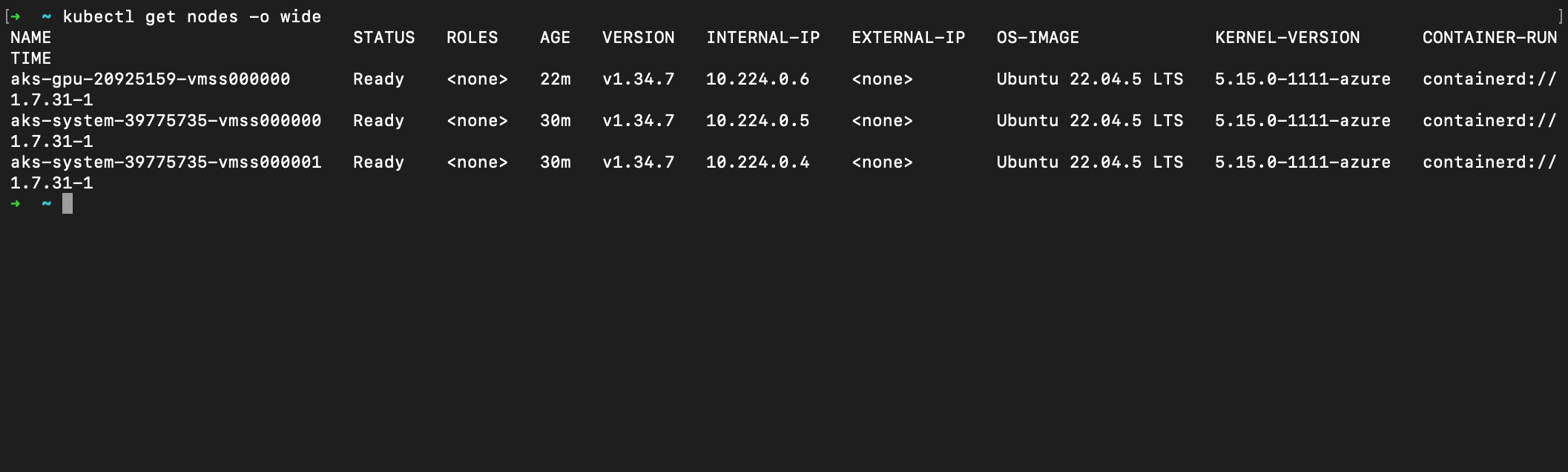
Here is what Terraform actually builds — two small, cheap system nodes for the boring infrastructure, and the dedicated GPU node that joins the pool:
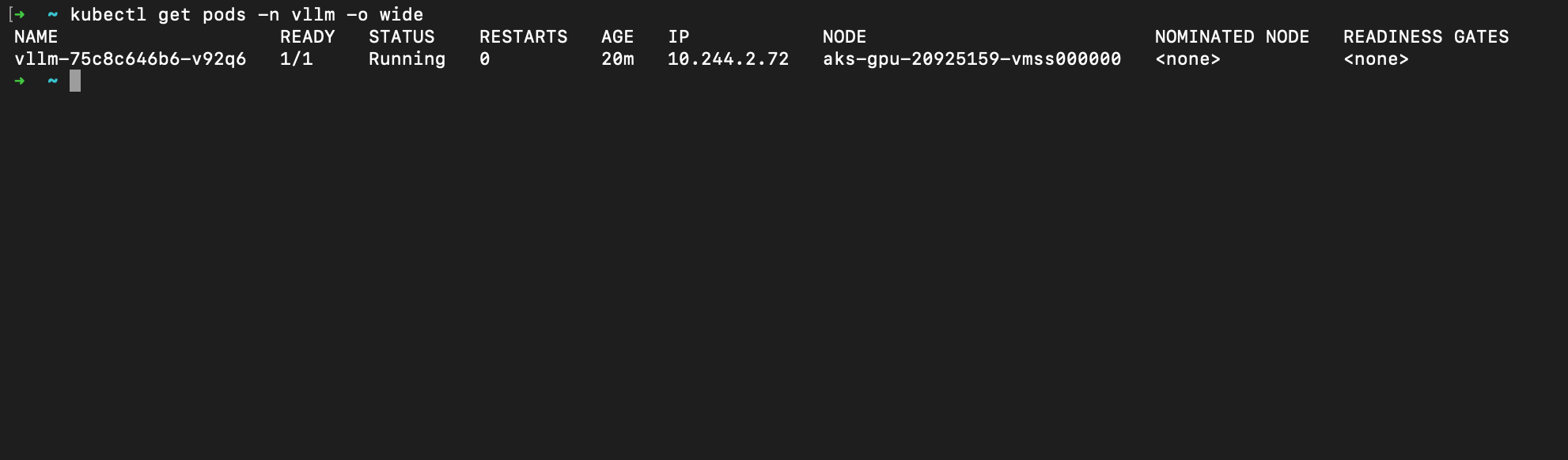
And here is the vLLM pod itself, scheduled straight onto that GPU node (look at the NODE column — it landed on aks-gpu-..., exactly as the taint and resource request intended):
Seeing It Actually Work
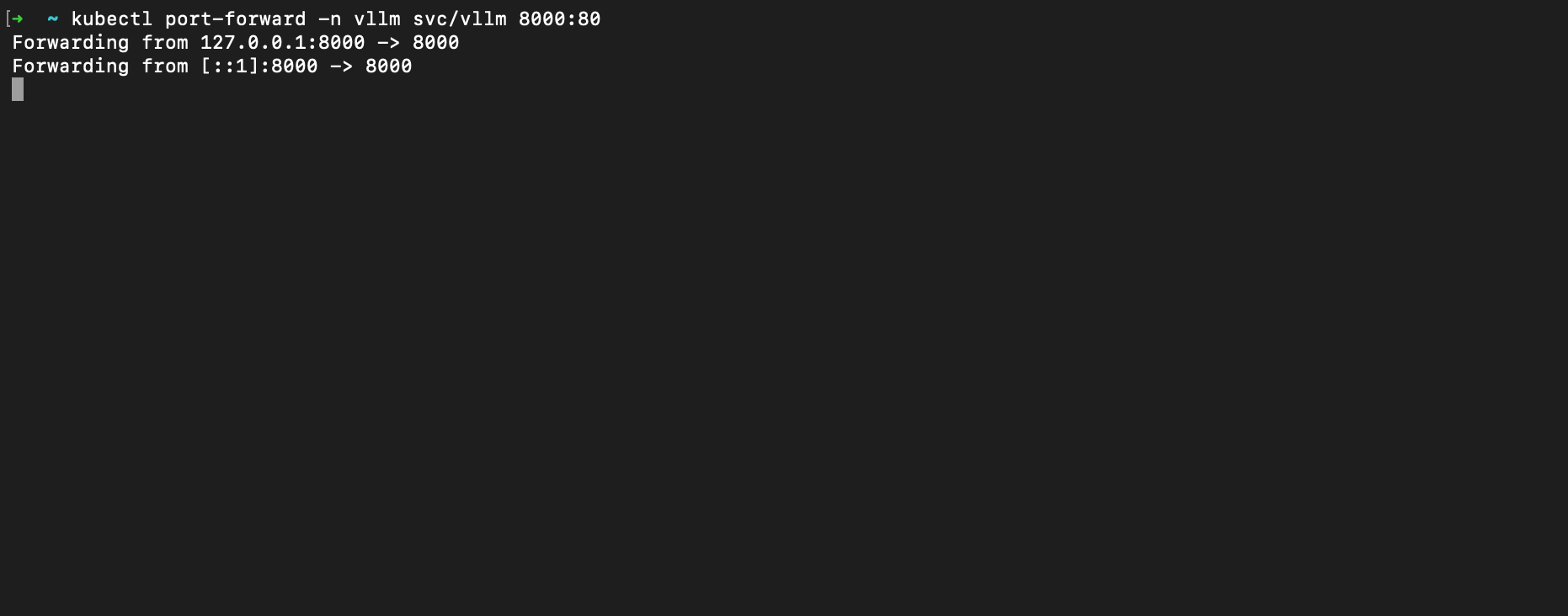
Enough theory — does it serve tokens? The endpoint lives behind an ingress inside the cluster, so the simplest way to talk to it from a laptop is a port-forward straight to the service:
With that tunnel open, it is just a normal OpenAI-style request. Here it is answering "explain what an LLM is to a 10 year old" — and notice the response is the exact OpenAI schema (object: chat.completion, a choices array, a usage block, even a system_fingerprint). That is the whole point of the OpenAI-compatible API: any existing OpenAI client works against it unmodified.
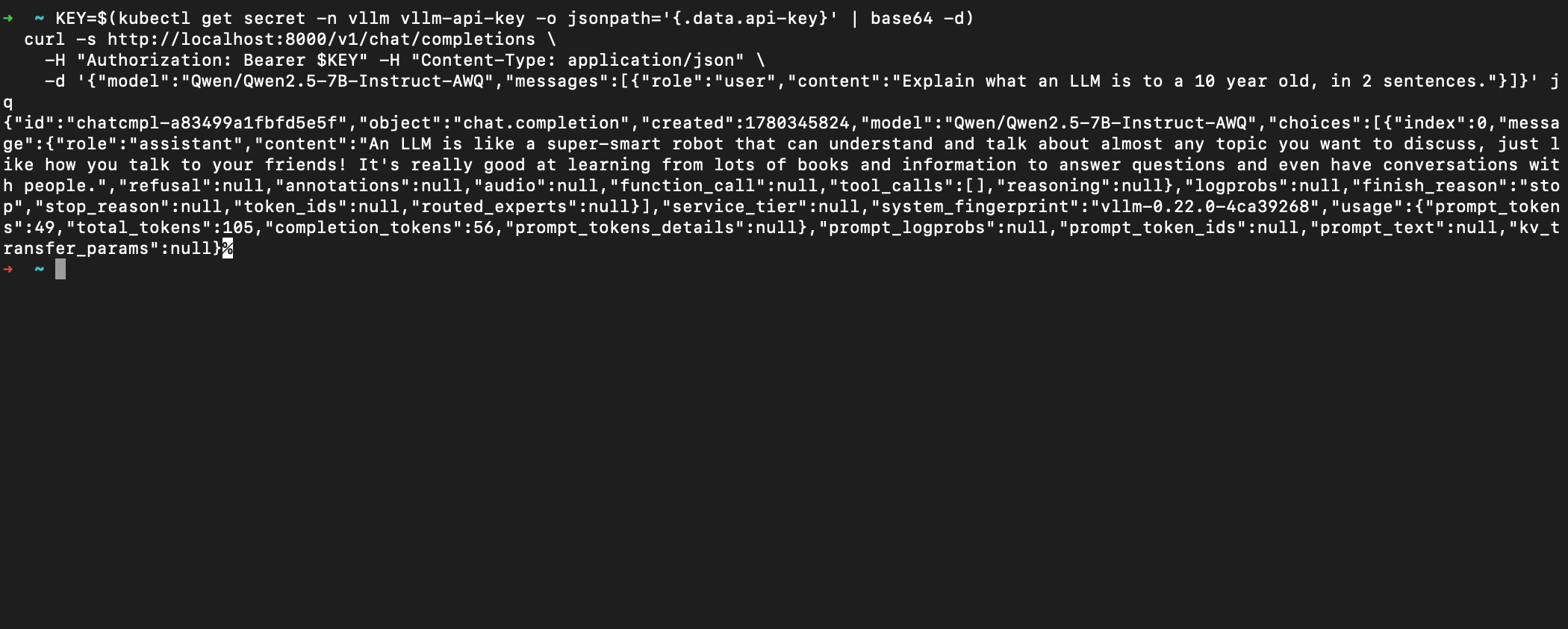
That answer was generated entirely on my own GPU, in my own cluster, with no third-party API anywhere in the loop.
The Headline Feature: Scale-to-Zero
This is the design choice I care about most, and the one that turns "expensive experiment" into "leave it there, it costs nothing."
A GPU node costs real money every hour it exists — for the card I used, around £0.40/hour. Leave it running for a month by accident and you have paid for a GPU that served a handful of requests. For anything that is not under constant load, an always-on GPU is wasteful.
The answer is to make the GPU disappear when idle and come back on demand, using KEDA and its HTTP add-on:
- The add-on places a lightweight interceptor in front of the model. When a request arrives and the model is scaled to zero, the interceptor holds the request, signals the autoscaler to spin a replica up, waits for it to be ready, then forwards the request through.
- After a configurable idle window (I used five minutes), it scales the model back down to zero — and with the GPU node pool's autoscaler allowed to reach zero nodes, the expensive hardware deprovisions entirely.
# The key bit: minimum replicas of zero
replicas:
  min: 0
  max: 1
scaledownPeriod: 300
The trade-off is honest and worth stating plainly: the first request after an idle period is slow. A GPU node has to be provisioned and the model reloaded into memory — a cold start of a minute or two. For an internal tool or a personal endpoint, waiting once for the first call of the day is a brilliant trade for paying nothing the rest of the time. The frontier labs are turning this exact dial in the opposite direction: they keep capacity warm because their cost of a slow first request is far higher than the cost of an idle GPU. Same mechanism, opposite economics.
The Troubleshooting Nobody Warns You About
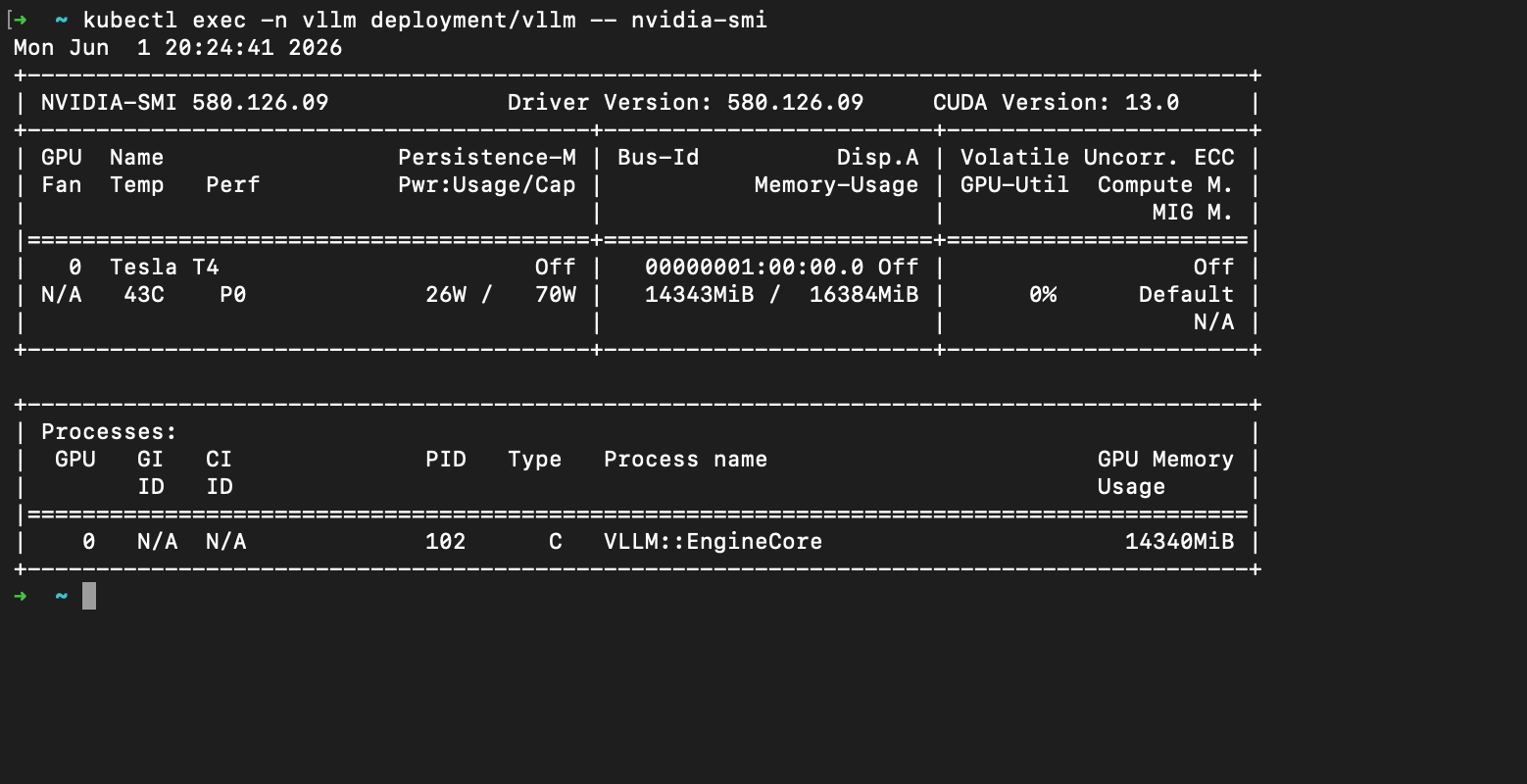
This is where I lost the most time, and where most tutorials go conveniently quiet. Nearly all of it traces back to one fact: I was deliberately using an old, cheap GPU — an NVIDIA Tesla T4, a Turing-architecture card (compute capability sm_75) with 16 GB of memory. A lot of modern inference defaults quietly assume something far newer, and the lessons generalise to anyone running current models on older hardware.
The attention backend that crashes on old GPUs
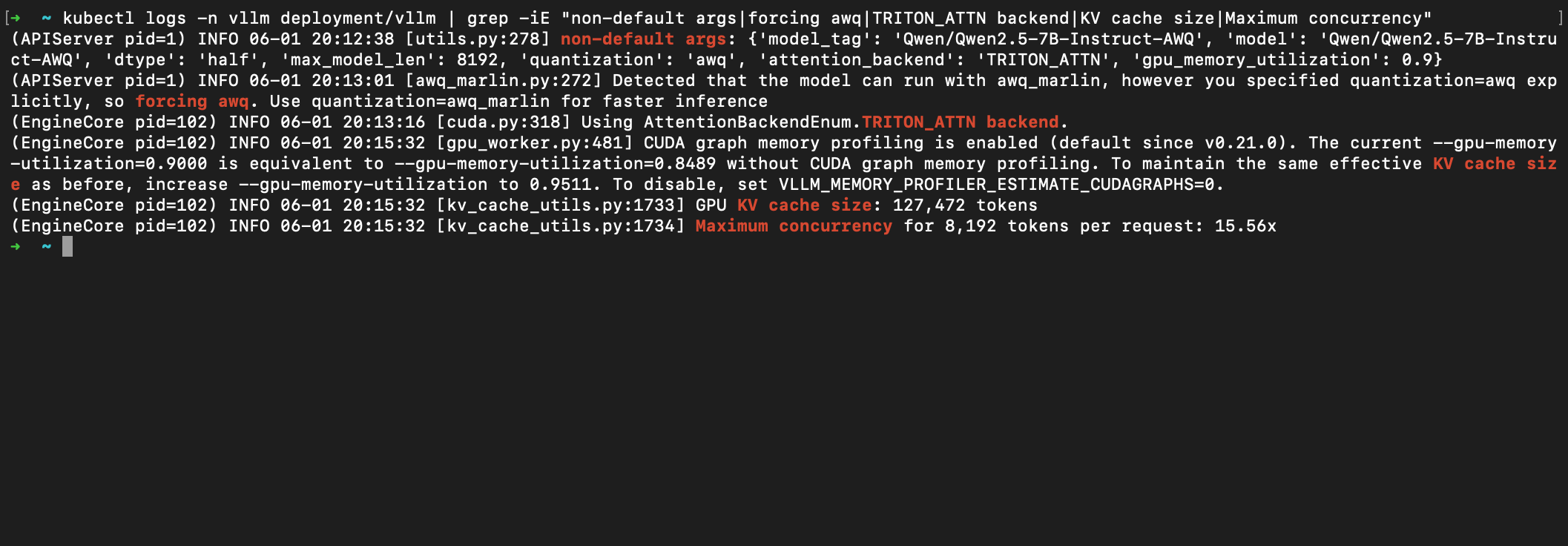
This was the big one. Recent vLLM defaults to FlashInfer as its attention backend, and FlashInfer's paged-KV prefill kernel CUDA-faults on any GPU below sm_80. On the T4, the server would come up cleanly and then crash the instant it tried to run attention, with the gloriously unhelpful BatchPrefillWithPagedKVCache failed with error: invalid argument. The fix is to force a backend that actually works on Turing:
--attention-backend TRITON_ATTN
The lesson: inference-engine defaults track the newest hardware, and you have to override them deliberately on anything older.
Picking the right quantization kernel
To fit a 7-billion-parameter model into 16 GB with room left for the KV cache, I used 4-bit AWQ-quantized weights. But vLLM's faster awq_marlin kernel, like everything else, expects newer hardware. The plain awq kernel is slower but actually runs on Turing — so I forced it with --quantization awq. vLLM even tells you it is making the trade for you: "Detected that the model can run with awq_marlin, however you specified quantization=awq explicitly, so forcing awq."
You can see all three of these decisions in the engine's own startup logs — the non-default args, the forced awq, and Using AttentionBackendEnum.TRITON_ATTN backend — followed by the payoff: a KV cache of 127,472 tokens and headroom for 15.56× concurrent requests on a single cheap GPU:
A self-inflicted wound: the environment-variable collision
Not every problem was the GPU's fault. Kubernetes, trying to be helpful, automatically injects environment variables describing every Service into every pod. Because of how I had named things, the model's own process received one of those auto-injected variables, misread it as configuration, and crashed on startup. The fix was a single setting that tells Kubernetes to stop injecting those legacy variables (enableServiceLinks: false). Hours of confusion; one line of YAML. The lesson: in Kubernetes, the platform's "helpful" defaults can collide with your application in ways that have nothing to do with your actual logic.
The day-one blocker: GPU quota
Before any of that, there is a gate that stops most people on their very first deploy: new cloud subscriptions often have a GPU quota of zero. Not a small allowance — zero. You cannot create a GPU node at all until you request an increase. It is free and usually quick, but if you do not know to ask, the failure is baffling.
What This Is Not (Yet)
This is a proof of concept, and being honest about the edges matters:
- TLS is not set up — the endpoint is HTTP with an API key (which, for what it is worth, is properly enforced: requests without a valid bearer token get a
401). Real certificates are the obvious next step. - Monitoring is deliberately left out. vLLM exposes Prometheus metrics out of the box, so dashboards are an easy add — but a permanently-running monitoring stack works against the "pay nothing when idle" goal, so it stays optional.
- Versions should be pinned rather than tracking
latestbefore anything resembling production.
None of these change the architecture. They are the gap between a learning project and a production service — and that gap is mostly hardening, not redesign.
The Takeaway
The thing I keep coming back to is how legible the whole stack turned out to be. Serving an LLM is not arcane and it is not reserved for companies with GPU superclusters. It is a model, an inference server, a container, a scheduler, and an autoscaler — and that is true whether you are running one GPU or ten thousand.
| Concern | This project | A frontier lab |
|---|---|---|
| Compute | One cheap, old GPU (Tesla T4) | Thousands of top-end GPUs |
| Inference server | vLLM | vLLM / TensorRT-LLM fleets |
| Orchestration | AKS, one GPU node pool | Multi-region Kubernetes |
| Scaling | KEDA scale-to-zero | Warm pools, traffic-aware routing |
| API | OpenAI-compatible | OpenAI-compatible |
Same building blocks, different dials. Get a real model answering questions on one cheap GPU, with the hardware switching itself off when idle, and you have hands-on understanding of the exact pattern the biggest names in AI use to serve their models — for the price of a coffee per session, and nothing at all while you sleep.
The full Terraform, the vLLM Helm chart, and a step-by-step setup guide (including the GPU-quota gotcha) are all on GitHub: okaneconnor/vllm-aks-terraform. Request your T4 quota, run the Terraform, and you can have your own OpenAI-compatible endpoint running in an afternoon with a lot of learning around vLLM.